
An end-to-end billing experience, directly from Dynamics 365
We built a full integration between PayPlus - the Israeli payment engine - and Microsoft Power Platform and Dynamics 365. Controlled, secure, Low-Code billing - without touching the PayPlus API and without storing credit card details inside the CRM.
Two modular solutions
Start small - and expand as needed
PayPlus Core
The connector (Custom Connector), Power Automate flows, and the setup wizard. Works across any Power Platform environment - even without Dynamics 365.
Dynamics 365 Sales
Full extension for sales processes: quotes, orders, and invoices - with payment links, statuses, and documents directly on the records.
The capabilities built into the integration
Everything you need to charge, sync, and document - without code

Full Custom Connector
An official PayPlus connector with full support for Production and Sandbox environments.

Hosted payment links
Create links directly from Power Automate and Dynamics 365 - the customer pays on PayPlus's secure page.

Built-in setup wizard
One-click connection, automatic import of terminals and payment pages, and end-to-end connection validation.

Automatic write-back
Transaction IDs, payment statuses, links, and documents are saved and updated inside Dataverse.

Continuous sync engine
A Sync Engine for data consistency between PayPlus and Dynamics over time - queue management and failure handling.

Document management Invoice+
Create, preview, and track invoices, receipts, and accounting documents.

Custom PCF controls
A payment-methods box, document viewer, and Mapping Studio - a rich user experience inside the forms.

Multi-channel sending
Payment links via Email, SMS, and WhatsApp directly from the system.

Governance, security & PCI
A standards-compliant architecture, no raw card data, with full documentation in Hebrew and English.
The Power Automate action catalog
Every action against PayPlus - billing, documents, customers, and catalog - available as a no-code building block
Transactions & payments
Payment link · Charge saved card · Standing order · Refund · Charge by token · Transaction approval · Search transactions
Accounting documents
Tax invoice & receipt · Tax invoice · Receipt · Credit invoice · Transaction account · Order · General document · Send by email · Cancel
Products & categories
Create, update, and search products and categories in the catalog
Document retrieval & search
Documents by transaction · Search · Document details · Download · List by dates · Status
Customers
Create customer · Update · Search · Retrieve full customer card
Delivery & inventory notes
Delivery note · Return · Stock entry · Stock exit
Reference data & settings
Terminals list · Cash registers list · Payment options
A payment-intake wizard for every payment method
Full or partial payment intake against a Dynamics 365 invoice, without leaving your work screen
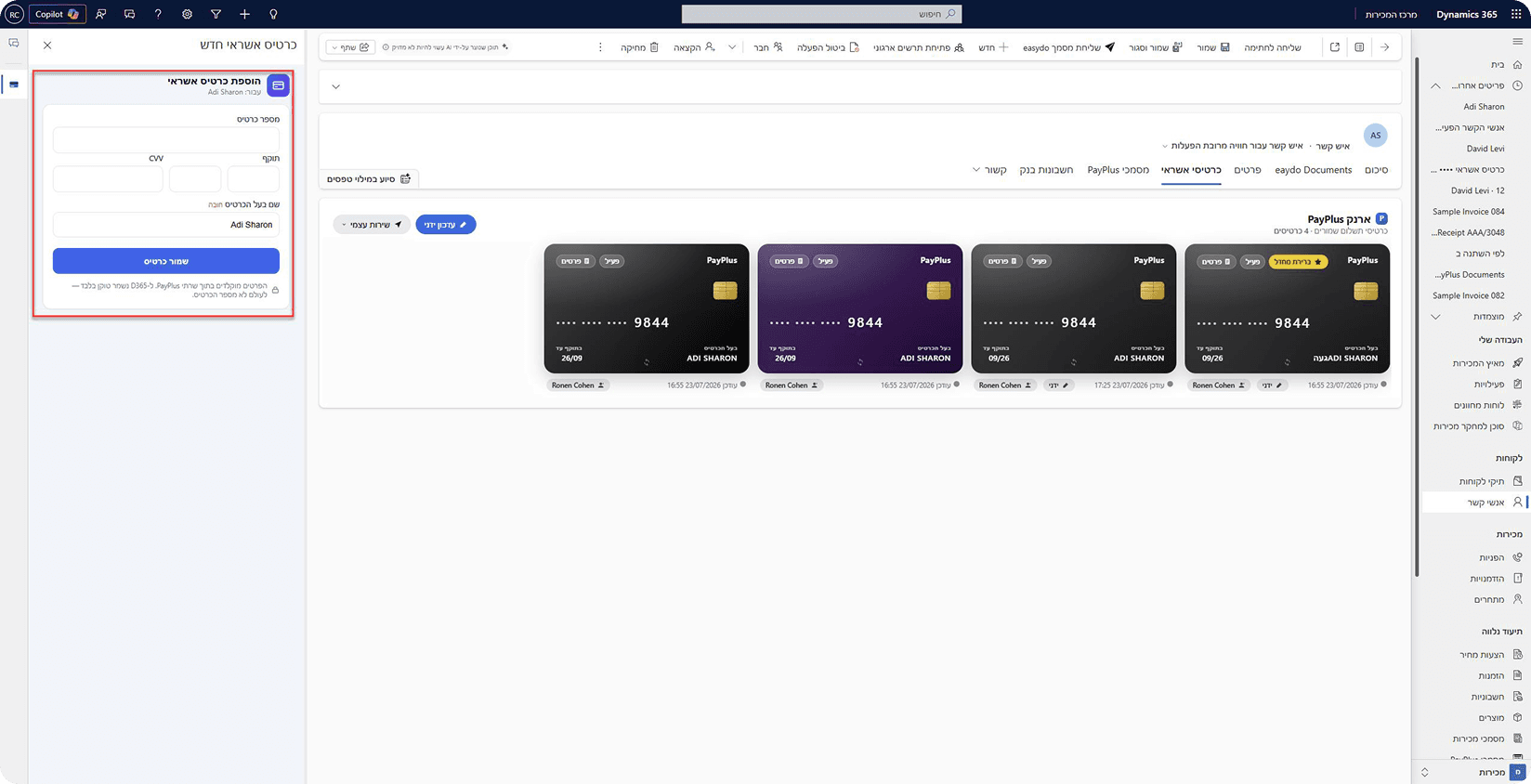
New credit card
Hosted Fields inside your work screen without leaving Dynamics 365, with token storage under the customer.
Saved card (token)
Reuse saved cards, including marking a preferred card for the customer.
Bank transfer
Existing or new accounts with a bank and branch intake interface against the Bank of Israel.
Checks
A single check or a series, including automatic issuance of a series by the check issuer.
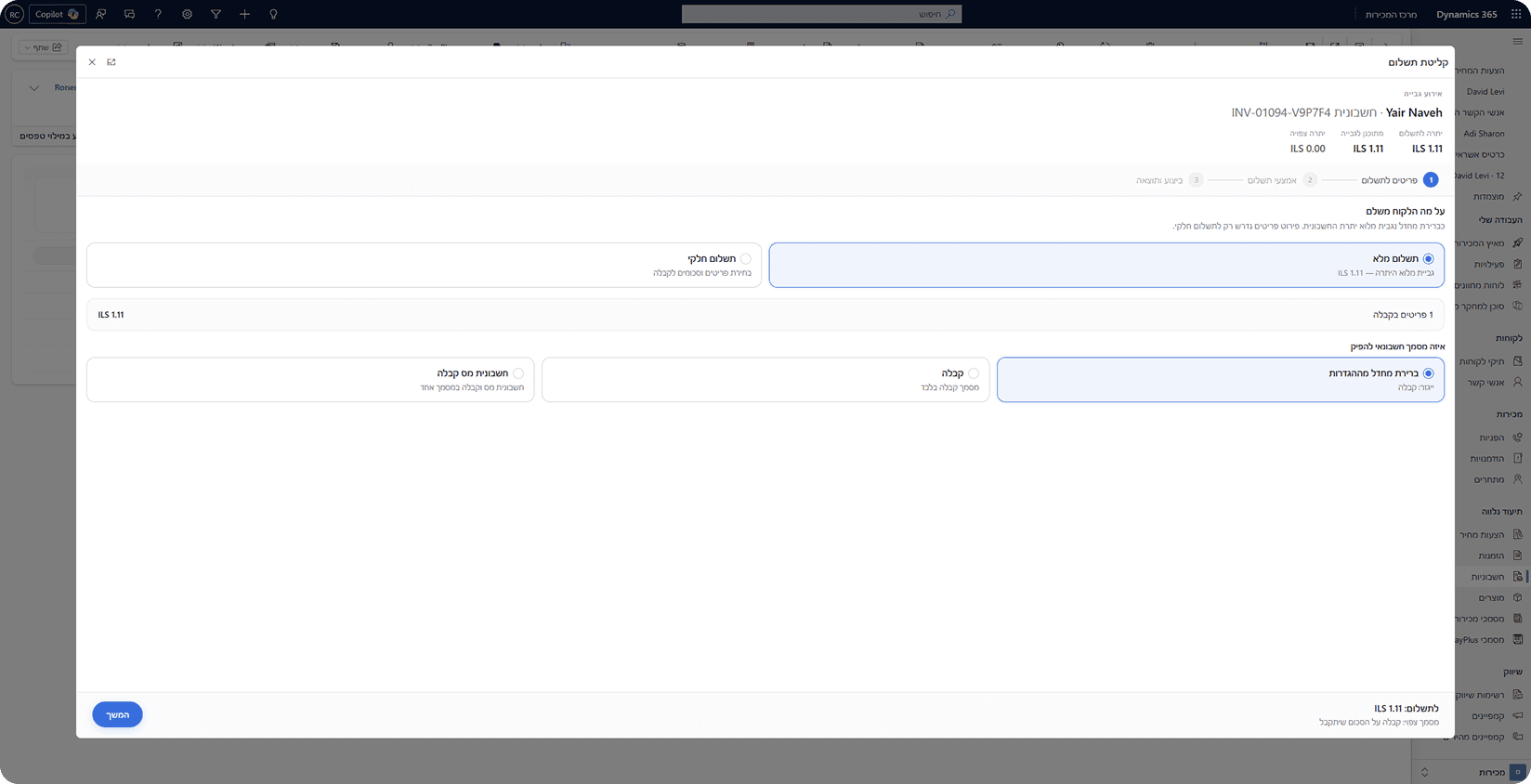
Partial payment: mark items and automatically open a new invoice for the balance | Automatic closing of the invoice record against the payment | Legal compliance check by document type and business
A two-layer data model
The extended model sits on top of the basic one and adds a bridge to sales without data duplication
The extended model — Dynamics 365 Sales
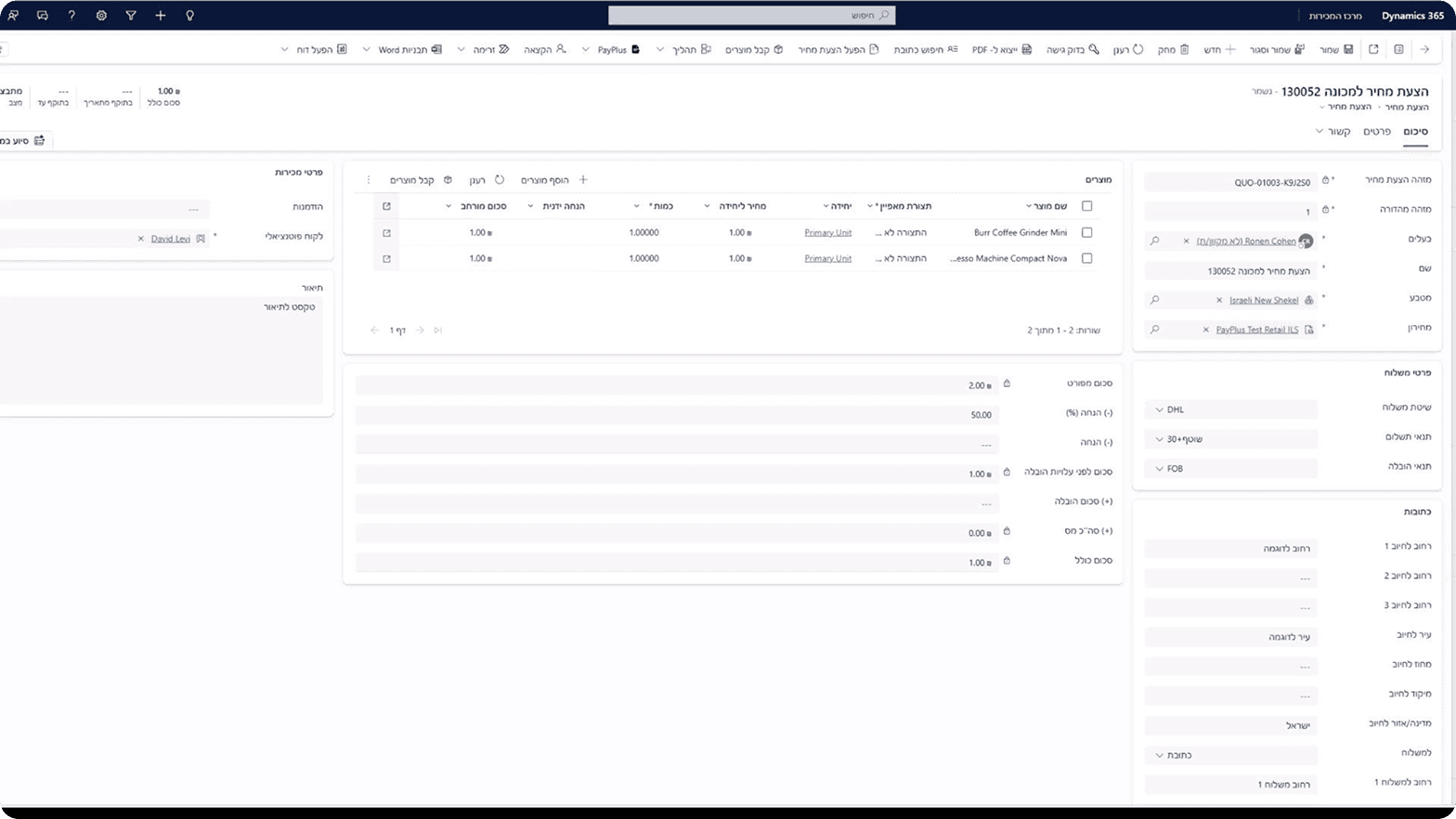
Price quotes
quote
Sales order
salesorder
Invoices
invoice
The basic model - works in any organization, even without a sales module
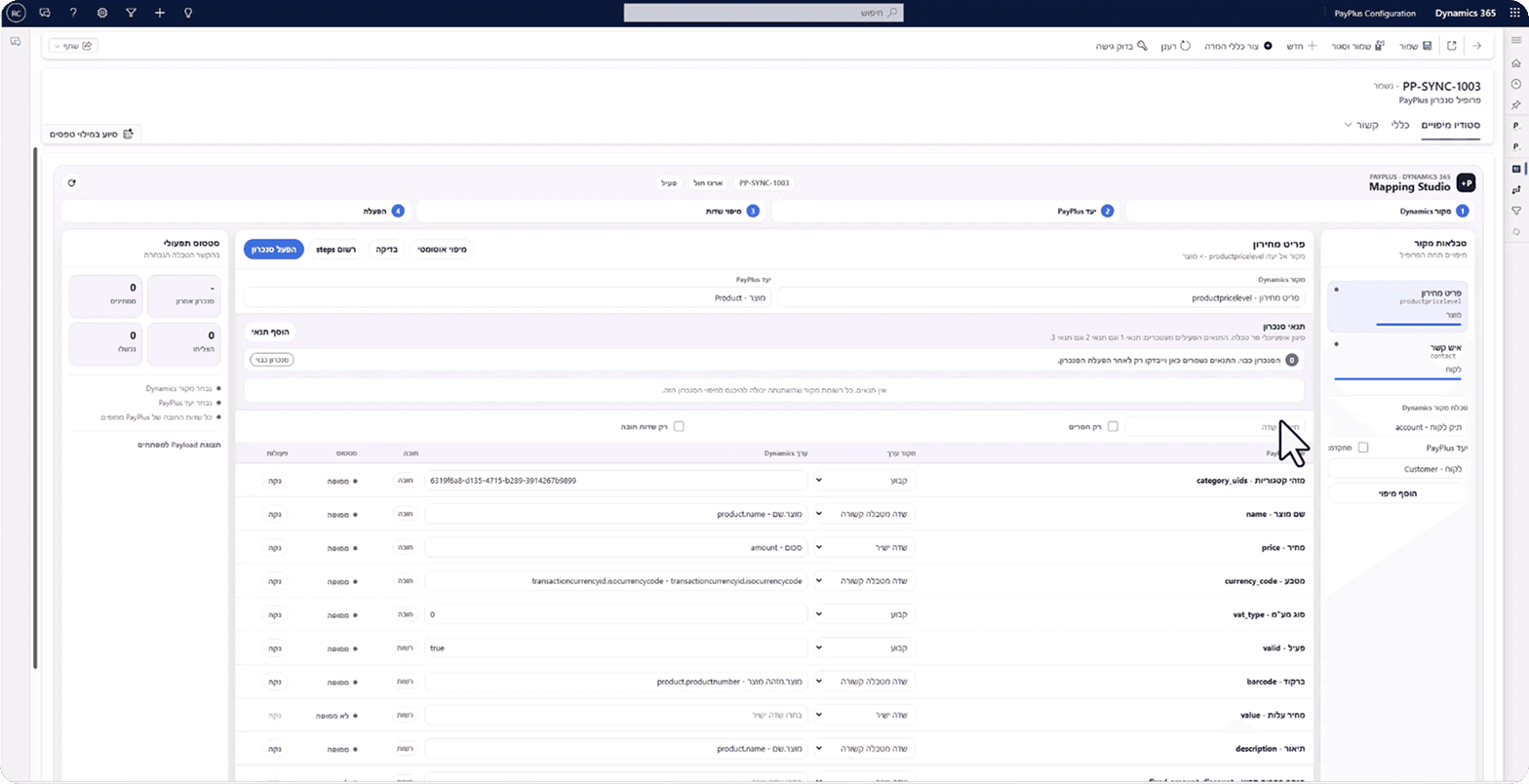
The sync engine and mapping studio
Configuration-driven sync that streams data to PayPlus and validates every step
1. Configuration
A sync profile with table and field mapping
2. Registration
Every active mapping registers a change listener
3. Capture
A change at the source is filtered and enters the queue
4. Sending
A background process streams the queue and validates every step
Mapping Studio - visual sync configuration
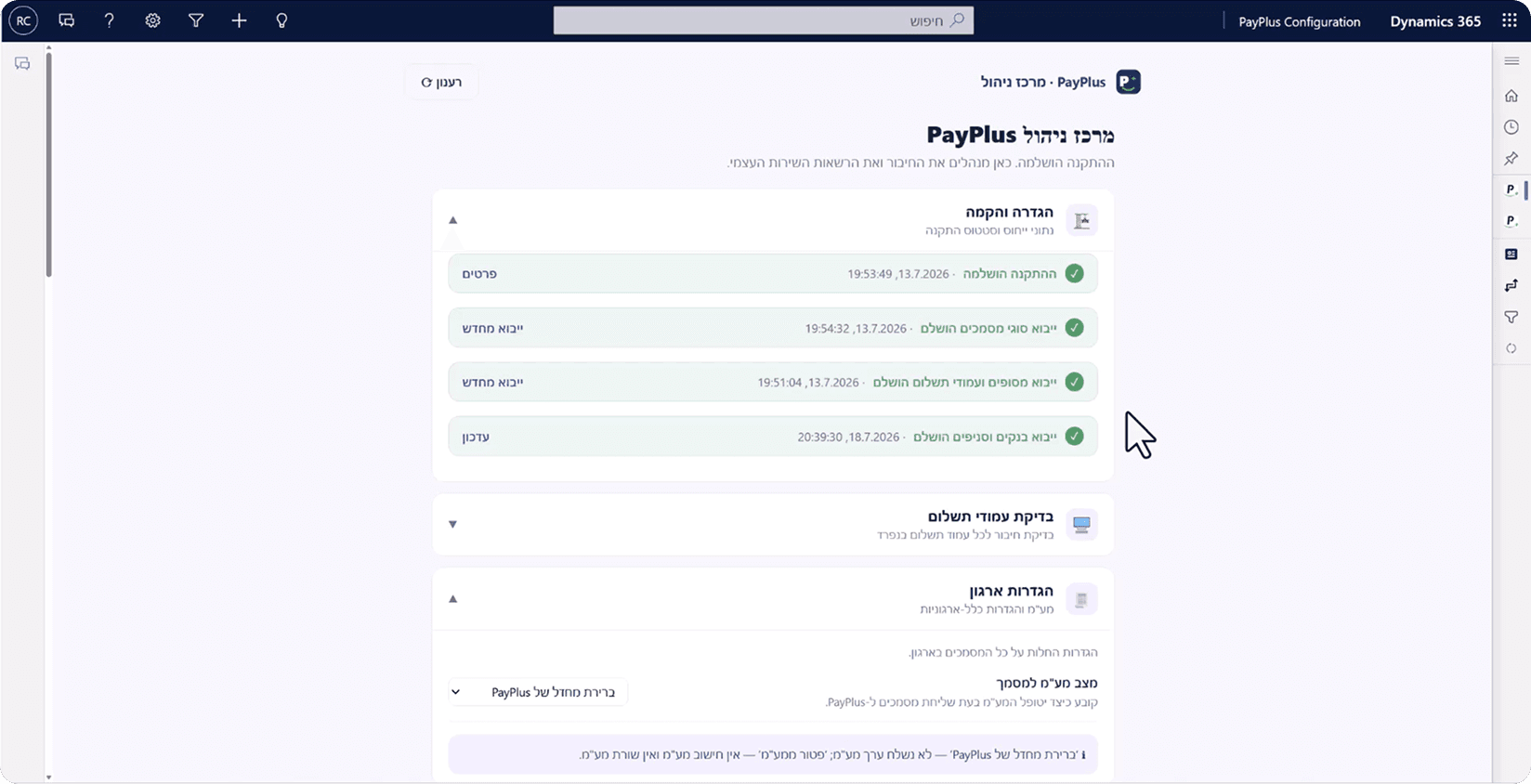
The management center and setup wizard
A few guided steps - and then the screen becomes an ongoing management center, in full Hebrew
Connection
Linking the connector to the payment provider
Payment pages
Choosing a terminal and payment page
Validation
A real connection check before activation
Data import
Document types, banks, and branches
Security and governance - built in, not an add-on
How the card stays with PayPlus - and only the token stays with you
1. Collection
Hosted Fields / hosted pageCard details are collected on PayPlus's secure page or in embedded fields — inside the Dynamics 365 work screen.
2. Token only
Stored in DataverseOnly a token is stored, without the card number. Secure input ensures the token is not saved in history.
3. Charging
Charges by tokenCharges are made by token. The keys (api-key · secret-key) are stored securely and injected as headers on every call.
A managed, shared connection for every process
The customer pays on PayPlus's secure page. Credit details never enter the CRM, and no raw card data is stored at any stage. The architecture meets governance, security, and PCI requirements - with full documentation in Hebrew and English.
Payment on PayPlus's hosted page — not in the CRM
No storage of raw card data at any stage
Production and Sandbox environments with real connection validation
Controlled and extensible — Business and IT in the same language
Ready to start collecting from within Dynamics 365?
The solutions, the setup wizard, and the full documentation (Hebrew + English) are available now. One-click installation, automatic terminal connection, and you start collecting.